Google Hotel Booking A Comprehensive Guide
Google Hotel Booking has revolutionized how we plan and book accommodations. No longer confined to scrolling through countless travel websites, we can now leverage Google’s powerful search engine to find the perfect hotel, comparing prices and amenities with ease. This guide delves into the functionality, user experience, advertising aspects, data presentation, and mobile optimization of Google Hotel Booking, offering a comprehensive overview for both travelers and hoteliers.
From understanding the intuitive interface and filtering options to navigating the booking process and exploring advertising opportunities, we’ll cover everything you need to know about maximizing your experience with Google Hotel Booking. We’ll also address common pain points and highlight best practices for a smooth and efficient booking process, regardless of whether you’re searching from your desktop or mobile device. We’ll explore how Google integrates user reviews and ratings, showcasing the importance of online reputation management for hotels.
Google Hotel Search Functionality
Source: travelmediagroup.com
Google Hotel Search provides a streamlined way to find and compare hotel prices from various sources. It aggregates data from numerous booking sites, allowing users to easily browse options and book directly through their preferred platform. This saves time and effort compared to visiting multiple websites individually.
Google Hotel Search User Interface
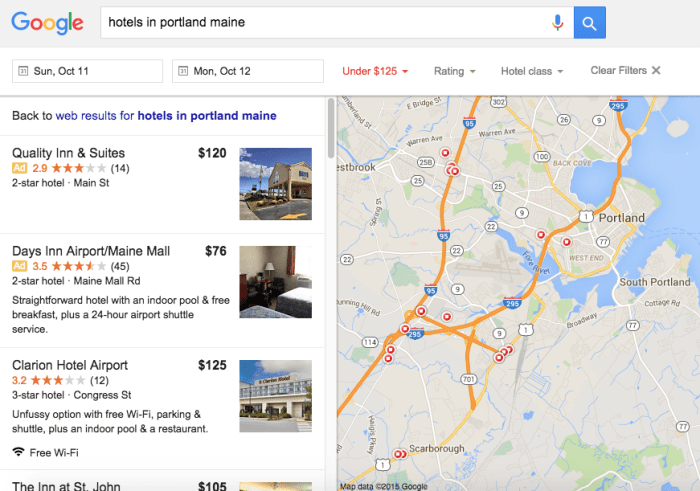
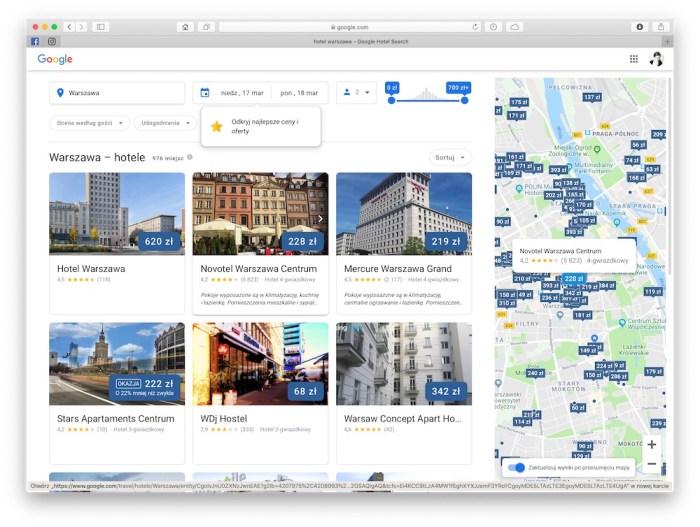
The Google Hotel Search interface is designed for intuitive navigation. Key features are clearly displayed, making it easy to find the information you need quickly.
| Feature | Description | User Benefit | Example |
|---|---|---|---|
| Search Bar | Allows users to input destination, dates, and number of guests. | Quick and easy initiation of hotel searches. | Typing “hotels in Paris, France October 26-28, 2 rooms” |
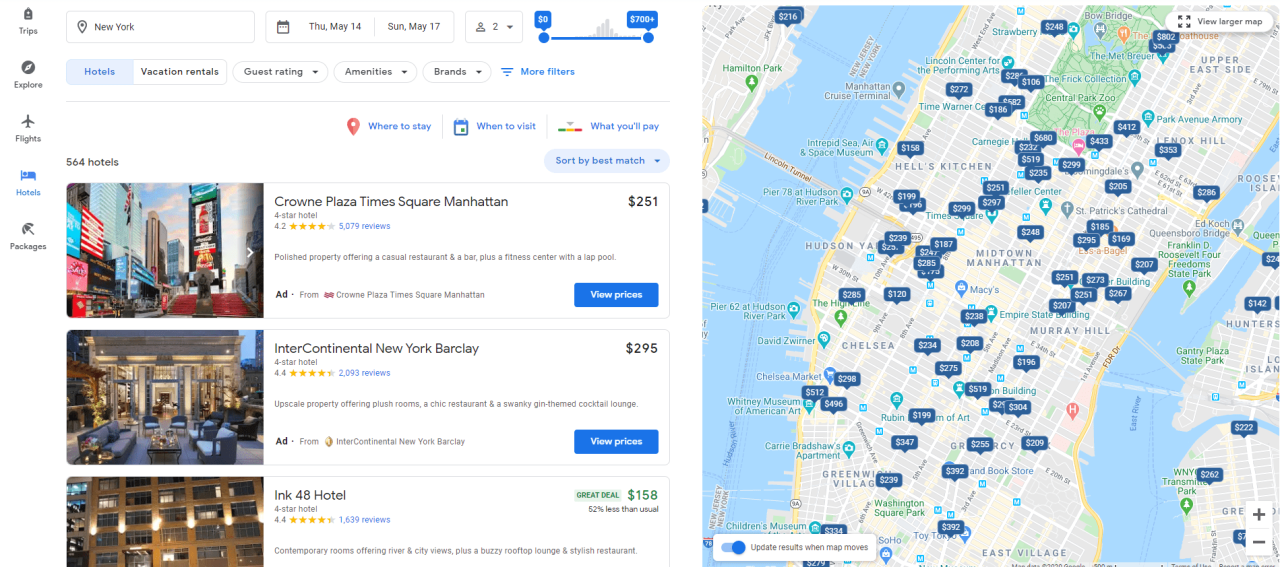
| Map View | Displays hotels on a map, showing their location relative to landmarks and other points of interest. | Visualizes hotel locations and proximity to desired attractions. | Seeing hotels clustered near the Eiffel Tower. |
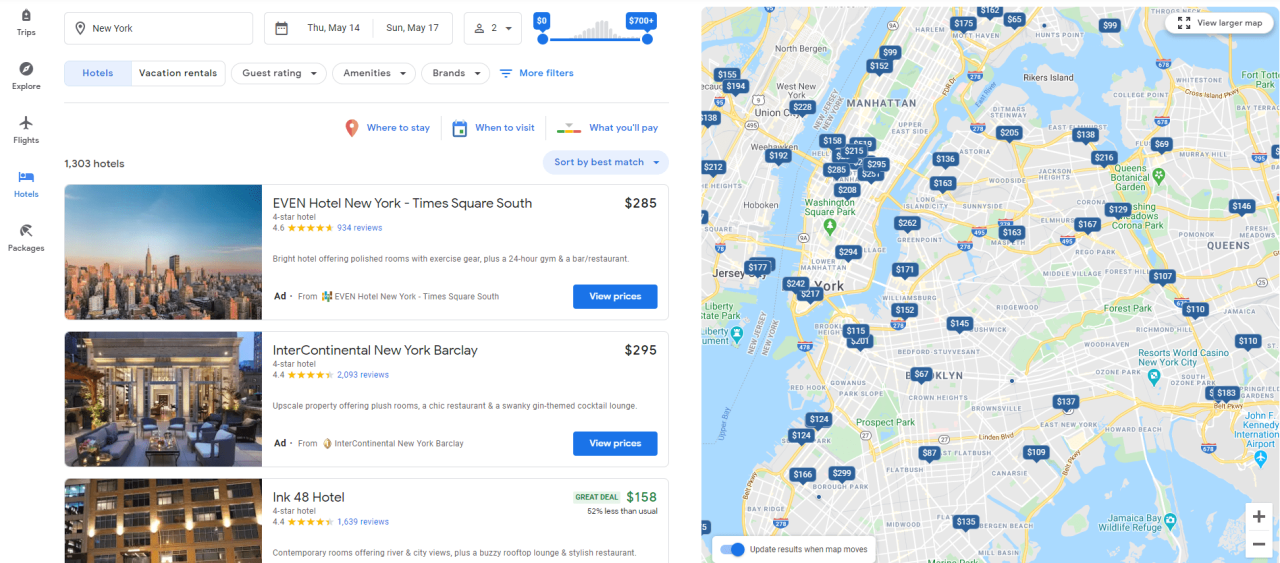
| Hotel Listings | Displays a list of hotels matching the search criteria, showing photos, prices, ratings, and amenities. | Provides a comprehensive overview of available options. | A list showing hotel names, star ratings, prices, and brief descriptions. |
| Filter Options | Allows users to refine search results based on various criteria. | Helps narrow down options to find the perfect hotel. | Filtering by price range, star rating, amenities (e.g., pool, free Wi-Fi). |
| Price Graph | Displays price fluctuations over time for selected hotels. | Helps users identify the best time to book for optimal pricing. | A line graph showing price changes for a specific hotel over several months. |
Google Hotel Search Filtering Options
Effective filtering is crucial for finding the ideal hotel. Google Hotel Search offers a wide array of filtering options to help users refine their search results efficiently.
The filtering options allow for highly customized searches, ensuring users find hotels that precisely match their needs and preferences. This eliminates the need to manually sift through numerous irrelevant listings.
- Price range
- Star rating
- Guest rating
- Amenities (e.g., pool, Wi-Fi, parking)
- Hotel type (e.g., resort, boutique, business)
- Location (e.g., neighborhood, proximity to landmarks)
- Cancellation policy
- Dates
- Number of guests
Google Hotel Search Price Comparison
Google Hotel Search compares prices from multiple OTAs, allowing users to identify the best deals. Its price comparison functionality offers a significant advantage over checking individual booking sites.
While all three platforms offer similar basic functionality, differences exist in features, user interface, and overall user experience. Google Hotels often highlights price differences more prominently, making it easier to spot bargains.
| Feature | Google Hotels | Expedia | Booking.com |
|---|---|---|---|
| Price Comparison | Displays prices from multiple sources simultaneously. | Shows prices from its own inventory and partner hotels. | Shows prices from its own inventory and partner hotels. |
| User Interface | Clean and simple interface, focusing on price comparison. | More complex interface with a wider range of features. | Detailed interface with extensive hotel information. |
| Filter Options | Offers a comprehensive set of filters. | Offers a wide range of filters, but can be overwhelming. | Provides extensive filters, but can be less intuitive than Google Hotels. |
| Booking Process | Redirects to the booking site for final booking. | Handles booking directly through its platform. | Handles booking directly through its platform. |
User Experience and Booking Process: Google Hotel Booking
Source: revenue-hub.com
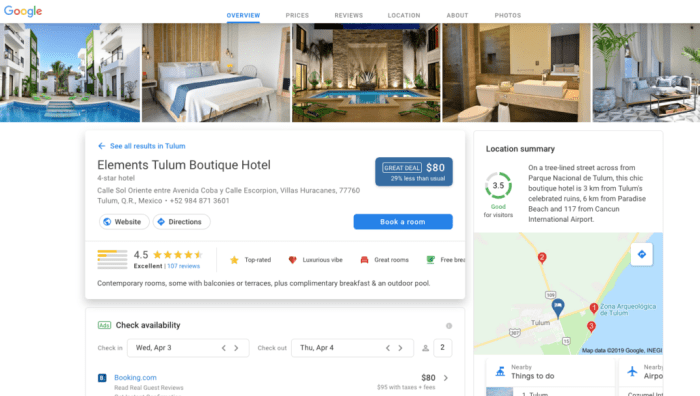
Google Hotels aims to provide a seamless and intuitive booking experience. This section details the user flow, step-by-step guidance, and potential pain points users might encounter. Understanding these aspects is crucial for optimizing the booking process and improving user satisfaction.
User Flow Diagram
The process of booking a hotel through Google Hotels can be visualized in a simple flow chart. The user begins by inputting search criteria (location, dates, number of guests). This leads to a results page displaying hotels matching the criteria. The user then selects a hotel, views details (photos, amenities, reviews), and proceeds to select their room type and preferences. Finally, they are redirected to the hotel’s booking page (or a third-party booking site) to complete the reservation. This process involves several decision points, such as refining search parameters or comparing different hotels before making a final choice. The entire process is designed to be as streamlined as possible, minimizing the number of steps and clicks required.
Step-by-Step Guide to Booking a Hotel
Let’s walk through a sample booking using Google Hotels. We’ll assume the user wants to book a hotel in New York City for two nights in October.
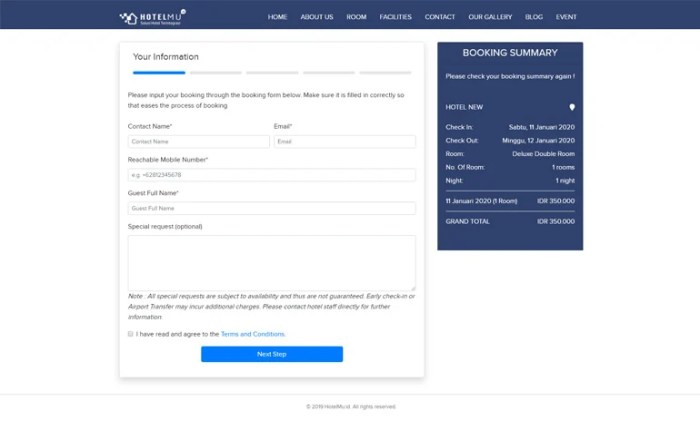
Step 1: Search: The user opens Google Hotels and enters “New York City” in the location field, selects their desired check-in and check-out dates (e.g., October 26th – October 28th), and specifies the number of guests (e.g., 2 adults). The search results page displays a list of hotels matching the criteria, sorted by price, rating, or other preferences. Imagine a screen showing a map with hotel markers, each with a price and star rating clearly visible.
Step 2: Hotel Selection: The user browses the results, potentially filtering by price range, star rating, amenities (e.g., free Wi-Fi, pool), and guest reviews. They click on a hotel that interests them to view more details. A detailed hotel page opens, showing multiple photos of the hotel, a description, amenities list, guest reviews, and available room types with prices.
Step 3: Room Selection and Booking: The user selects their preferred room type, reviews the total price (including taxes and fees), and clicks a “Book Now” button. This button is typically prominently displayed. This action usually redirects the user to the hotel’s website or a third-party booking platform (like Booking.com, Expedia, etc.) to complete the reservation using their preferred payment method. The final booking confirmation page from the hotel or third-party site will show a booking reference number.
Potential Pain Points During the Booking Process
Several aspects of the booking process can lead to user frustration. Understanding these pain points is vital for improvement.
- Confusing Pricing: Hidden fees or unclear displays of taxes and other charges can lead to unexpected costs at the final booking stage, causing disappointment and potentially abandonment of the booking.
- Lack of Transparency: Insufficient information about cancellation policies, room details, or hotel amenities can lead to uncertainty and hesitation in completing the booking.
- Difficult Navigation: A poorly designed interface or confusing navigation within the Google Hotels site can frustrate users and make it difficult to find the information they need.
- Redirects to Third-Party Sites: While sometimes unavoidable, excessive redirects to other booking sites can disrupt the user experience and create confusion.
- Inconsistent Information: Discrepancies between information displayed on Google Hotels and the hotel’s own website can lead to distrust and uncertainty.
Google Hotel Ads and Partnerships
Source: oktawave.com
Google Hotel Ads offer hotels a powerful way to connect with potential guests actively searching for accommodation on Google. By leveraging Google’s vast reach and sophisticated targeting options, hotels can significantly increase their visibility and drive direct bookings. Understanding the different ad formats and strategic partnerships available is crucial for maximizing the return on investment.
Google Hotel Ads provides various advertising options tailored to different hotel marketing needs and budgets. These options allow hotels to control their advertising spend and target specific customer segments. Understanding the nuances of each option is key to effective campaign management.
Google Hotel Ads Options
Several ad formats are available within Google Hotel Ads, each with its own advantages and disadvantages. Choosing the right format depends on your hotel’s marketing goals and budget.
| Ad Type | Description | Benefits |
|---|---|---|
| Standard Hotel Ads | These ads appear in the Google Hotel Search results, displaying your hotel’s name, price, and photos. | High visibility, direct bookings, clear pricing information. |
| Enhanced Hotel Ads | These ads build upon standard ads, adding features like special offers, amenities highlights, and customer reviews. | Improved click-through rates, increased conversions, enhanced brand perception. |
| Hotel Ads with Google Maps Integration | These ads appear in Google Maps, allowing potential guests to see your hotel’s location and amenities at a glance. | Increased visibility for location-based searches, convenience for users. |
Key Google Hotels Partnerships
Google Hotel Search’s success is partly due to its strategic partnerships with major players in the travel industry. These partnerships ensure seamless integration and broad reach for hotels utilizing the platform.
- Online Travel Agencies (OTAs): Google partners with numerous OTAs, such as Expedia, Booking.com, and Kayak, to display hotel prices and availability across various platforms.
- Global Distribution Systems (GDS): Integration with GDS like Amadeus and Sabre enables hotels to reach a wider audience of travel agents and corporate bookers.
- Hotel Management Systems (PMS): Partnerships with PMS providers streamline the process of managing inventory and pricing across different channels.
- Metasearch Engines: Collaboration with metasearch engines allows hotels to broaden their visibility and reach a larger pool of potential guests.
Impact of Google Hotel Ads on Hotel Booking Strategies
Google Hotel Ads have significantly impacted how hotels approach their booking strategies. Hotels now need to consider how Google’s platform fits into their overall digital marketing plans.
- Increased Focus on Direct Bookings: Hotels are increasingly prioritizing driving direct bookings through their websites to reduce reliance on OTAs and increase profit margins. Google Hotel Ads play a key role in achieving this.
- Enhanced Price Competitiveness: The transparency of Google Hotel Search necessitates hotels to be highly competitive with their pricing to attract bookings. Careful price management and dynamic pricing strategies are crucial.
- Data-Driven Decision Making: Google Hotel Ads provide detailed performance data, allowing hotels to optimize their campaigns and improve their return on investment (ROI) through data analysis and A/B testing.
- Improved Customer Experience: By offering a seamless booking experience and clear information on Google, hotels can enhance their brand reputation and customer satisfaction.
Data and Information Displayed

Source: wersm.com
Google Hotels presents a wealth of information to help users make informed decisions about their accommodation. The platform prioritizes clear and concise presentation, utilizing visuals and structured data to highlight key details quickly and efficiently. This allows users to compare options and find the perfect hotel with minimal effort.
The display of hotel information is designed for quick comprehension and comparison. Key elements are prominently featured, while less crucial details are easily accessible upon further investigation. This approach ensures a smooth and efficient user experience.
Hotel Information Presentation, Google hotel booking
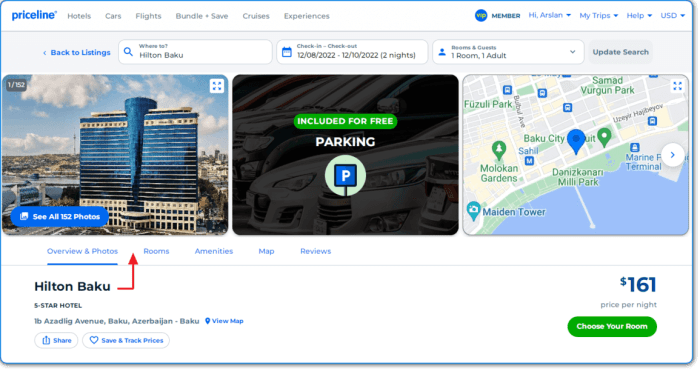
Google Hotels displays hotel information using a combination of text, images, and interactive elements. A typical hotel listing includes a prominent hero image showcasing the hotel’s exterior or a key feature like a pool or lobby. Below this, users will find a concise summary including the hotel’s name, star rating, and a brief description highlighting key selling points. Further down the page, more detailed information is organized into easily digestible sections. For example, amenities are often listed in a clear, concise bulleted format, while guest reviews are presented with an average rating and a selection of individual reviews. High-quality photos are scattered throughout, offering potential guests a visual tour of the hotel’s rooms, amenities, and surrounding area. The layout emphasizes visual appeal, with clean lines and ample white space to prevent information overload.
Hotel Pricing Information
Google Hotels displays pricing information clearly, aiming for transparency. The initial price shown usually represents the base rate for the selected dates and room type. However, Google makes sure to detail any additional taxes and fees before a booking is confirmed. This avoids surprises at checkout. Here’s an example of how pricing might be presented in a table:
| Room Type | Base Rate | Taxes | Fees | Total |
|---|---|---|---|---|
| Standard Double | $100 | $10 | $5 | $115 |
| Deluxe Suite | $200 | $20 | $10 | $230 |
Note that the exact breakdown of taxes and fees will vary depending on location, hotel policy, and the specific booking details.
User Reviews and Ratings Integration
User reviews are a crucial part of the Google Hotels experience. The platform prominently displays the average star rating for each hotel, usually next to the hotel name and image. This serves as a quick visual cue for users to gauge the overall guest satisfaction. Clicking on the rating reveals a more detailed review section, showing the distribution of star ratings (e.g., percentage of 5-star, 4-star, etc. reviews). Individual reviews are also displayed, often including text, photos, and timestamps. Google often highlights verified reviews, giving users more confidence in the authenticity of the feedback. For example, a hotel with a consistently high average rating and numerous positive reviews will likely attract more bookings than a similar hotel with lower ratings and negative feedback. The prominence and detailed nature of the review section significantly influence user decisions. Users often prioritize hotels with high ratings and positive reviews, even if it means paying slightly more.
Mobile Optimization and Accessibility
Source: fastly.net
Google Hotel Search aims for a seamless experience across all devices, but the mobile experience naturally differs from the desktop version due to screen size and user interaction preferences. Optimizing for mobile is crucial for accessibility and user satisfaction, especially given the prevalence of mobile bookings.
The differences between the desktop and mobile experiences are primarily focused on interface adjustments to accommodate smaller screens and touch input. While the core functionality remains consistent, the presentation and interaction methods are tailored to the mobile context. This includes simplifying navigation, optimizing visual elements, and ensuring that all key features are easily accessible on smaller displays.
Desktop versus Mobile User Experience
The following table compares the key differences in functionality and usability between the desktop and mobile versions of Google Hotel Search.
| Feature | Desktop | Mobile |
|---|---|---|
| Screen Real Estate | More space for detailed information, multiple filters, and larger map views. | Less space necessitates prioritized information display and collapsible menus. |
| Input Method | Primarily keyboard and mouse. | Primarily touch input, optimized for finger taps and swipes. |
| Navigation | More complex navigation with multiple menus and sub-menus. | Simplified navigation with intuitive icons and swipe gestures. |
| Map Integration | Larger, more detailed map view with multiple interactive elements. | Compact map view, often integrated within the hotel listing, with pinch-to-zoom functionality. |
| Filter Options | Numerous filter options displayed simultaneously. | Filter options may be presented in a collapsible menu or in a step-by-step manner. |
| Booking Process | Generally involves more steps and larger forms. | Streamlined booking process optimized for mobile input and reduced steps. |
Accessibility Features
Google Hotel Search incorporates several accessibility features to ensure inclusivity for users with disabilities. These features aim to make the platform usable and enjoyable for everyone.
- Screen Reader Compatibility: The platform is designed to be compatible with screen readers, allowing visually impaired users to navigate and access information using auditory cues.
- Keyboard Navigation: Users can navigate the entire platform using only a keyboard, eliminating the need for a mouse or touch input, benefiting users with motor impairments.
- High Contrast Mode: Users can adjust the contrast levels of the interface to improve readability and reduce eye strain, beneficial for users with low vision.
- Alternative Text for Images: Images include descriptive alternative text, allowing screen readers to convey visual information to visually impaired users.
- Font Size Adjustments: Users can adjust the text size to improve readability, catering to users with visual impairments.
Mobile Optimization Mockups
To further enhance the mobile experience, consider these design improvements. These are conceptual illustrations and not actual images.
Mockup 1: Simplified Search Results Page: The initial search results page would display a concise list of hotels with prominent images, star ratings, prices, and a brief description. A large, easily accessible filter icon would be placed prominently. The map would be a smaller, integrated element that expands on tap. This prioritizes visual clarity and quick information scanning.
Mockup 2: Intuitive Booking Flow: The booking process would be simplified into a few clear steps, using large, easy-to-tap buttons and minimal form fields. Progress indicators would visually guide the user through each stage. Confirmation screens would be clean and concise, emphasizing key booking details. This aims to minimize cognitive load and prevent user frustration.
Mockup 3: Personalized Recommendations: The mobile interface could incorporate more personalized recommendations based on user search history and preferences. This could involve suggesting similar hotels or offering curated travel packages. This adds value and enhances user engagement.
Closing Notes
Source: fastly.net
Mastering Google Hotel Booking empowers both travelers and hotels. For travelers, it simplifies the search and booking process, ensuring you find the best deals and accommodations tailored to your needs. For hotels, understanding Google Hotel Ads and optimizing your online presence is crucial for attracting more guests and maximizing revenue. By understanding the nuances of this powerful tool, you can navigate the world of hotel bookings with confidence and efficiency. Remember to always check reviews, compare prices across platforms, and read the fine print before confirming your booking.